*Please save your secret key for future use.
*2fa data is not stored, this is just a one-time generator
A fast and secure online 2FA Auth generator that creates TOTP verification codes directly in your browser. No data stored, no login required, 100% private. Compatible with Google Authenticator, Authy, and all major two-factor authentication apps.
Two-factor authentication is an additional layer of security that helps protect online accounts from unauthorized access. This concept, often referred to as two-factor authentication (2FA Auth), requires users to enter two forms of verification before they can access their accounts.
With 2FA Auth, the risk of data breaches and account hijacking is significantly lower than using passwords alone.
Many people may have heard the terms 2FA or 2FA auth, but they don’t fully understand how it works and its importance. In this article, we will discuss what 2FA is, how it works, its benefits, implementation examples, and tips for choosing the right two-factor authentication method to protect your personal and business accounts.
What Is Two-Factor Authentication (2FA)?
Two-Factor Authentication (2FA) is an additional layer of security used to protect your online accounts. It requires users to pass two levels of verification to access certain accounts or systems.
This method requires users to enter not only a password but also a unique code or other additional proof. This system, also known as two-factor authentication (2FA), is increasingly used by major platforms like Google, Facebook, and online banking services. By adding this second layer, the risk of account hacking is significantly reduced.
Why is Two-Factor Authentication Important?
Passwords alone are no longer enough to protect our accounts from cyber threats. Two-factor authentication helps prevent account theft because even if an attacker knows the password, they still need a second factor to gain access.
This makes two-factor authentication an effective solution for reducing data breaches and maintaining the security of personal information.
Types of Two-Factor Authentication
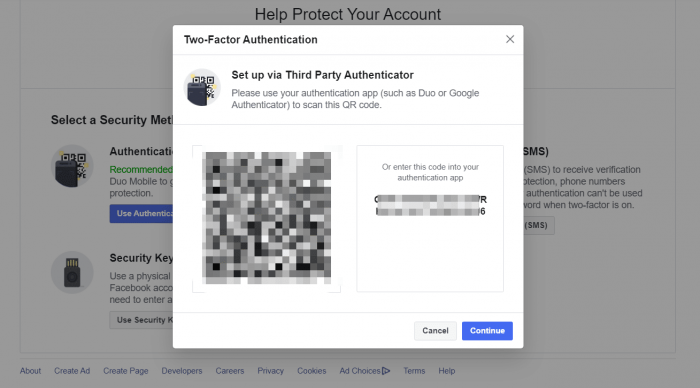
There are several types of 2FA commonly used. The most common method is SMS or email, which sends a verification code to the user’s phone. There are also authenticator apps like Google Authenticator or Authy, which generate unique codes every few seconds.
For companies or users with high security requirements, physical tokens or security keys are also available, which act as a second factor. With these various methods, users can choose the one that best suits their needs and security level.
How Two-Factor Authentication Works
The two-factor authentication process typically begins after a user enters a username and password. The system then requests a second factor, such as a code sent via SMS, an authenticator app, or a physical device.
Once the code is entered and verified, the user gains full access to the account. This process is simple and quick, yet highly effective in preventing unauthorized access.
This tool helps you generate a time-based one-time password (TOTP) using the secret key you already have.
It works entirely on your device and returns only the generated 6-digit verification code.
- We do not store, share, or log your secret key.
- We do not access any external accounts or third-party services.
- All processing is done securely on your browser.
This tool is intended only for personal use, and only with secret keys that you legally own.
Tips for Using 2FA Auth Safely
For added security, choose the most appropriate 2FA authentication method. Authenticator apps are generally preferred over SMS because they are more difficult to intercept.
Store backup codes in a safe place to avoid losing access to your account. Additionally, avoid using shared devices or public Wi-Fi networks when logging in with 2FA to minimize the risk of data theft.
Security Reminder
For your safety:
- Never share your 2FA secret key with anyone.
- Keep your codes and secret keys private and stored securely.
- Use this generator only for accounts you own and manage.
- If you believe your secret key has been exposed, regenerate a new one immediately.
- Always follow best practices for online security and account protection.
Privacy Notice
We do not collect:
- Secret keys
- TOTP codes
- IP addresses
- Account information
- User identifiers
No data is saved or transmitted beyond what is required to generate your own code.
Two-Factor Authentication Implementation Example
Many well-known platforms have implemented two-factor authentication. Google, Facebook, Instagram, and even online banking services offer this feature to protect their users.
In fact, some services have made 2FA a mandatory feature that must be activated before accessing sensitive data. By enabling 2FA, your account becomes much more difficult to hack, even if your password is known.
Conclusion
Two-factor authentication is a simple yet highly effective way to improve the security of your online accounts. By understanding the types and how they work, you can choose the most appropriate two-factor authentication method to protect your personal and business data. Don’t delay activating 2FA on your important accounts to ensure your data security.
Protect your accounts now! Enable two-factor authentication on all your important platforms and enjoy extra peace of mind.
two factor authentication generator, online 2FA code generator, TOTP online generator, free authenticator tool, 2FA secret key generator, 2FA verification code online, time-based one-time password generator, google authenticator alternative, online authenticator tool, secure 2FA website